
How to use the bulk manager in Crypto Hopper

This guide provides instructions on how to effectively manage multiple bots at once using the Bulk Bot Manager option.
Prerequisites
Before using Bulk Bot Manager, make sure you meet the following requirements:
- An active Cryptohopper account is required.
- You must have at least 3 bot subscriptions .
How to use Bulk Bot Manager
- Go to the Marketplace and select the “Apps” section.
- Find and click on the Bulk Manager option.
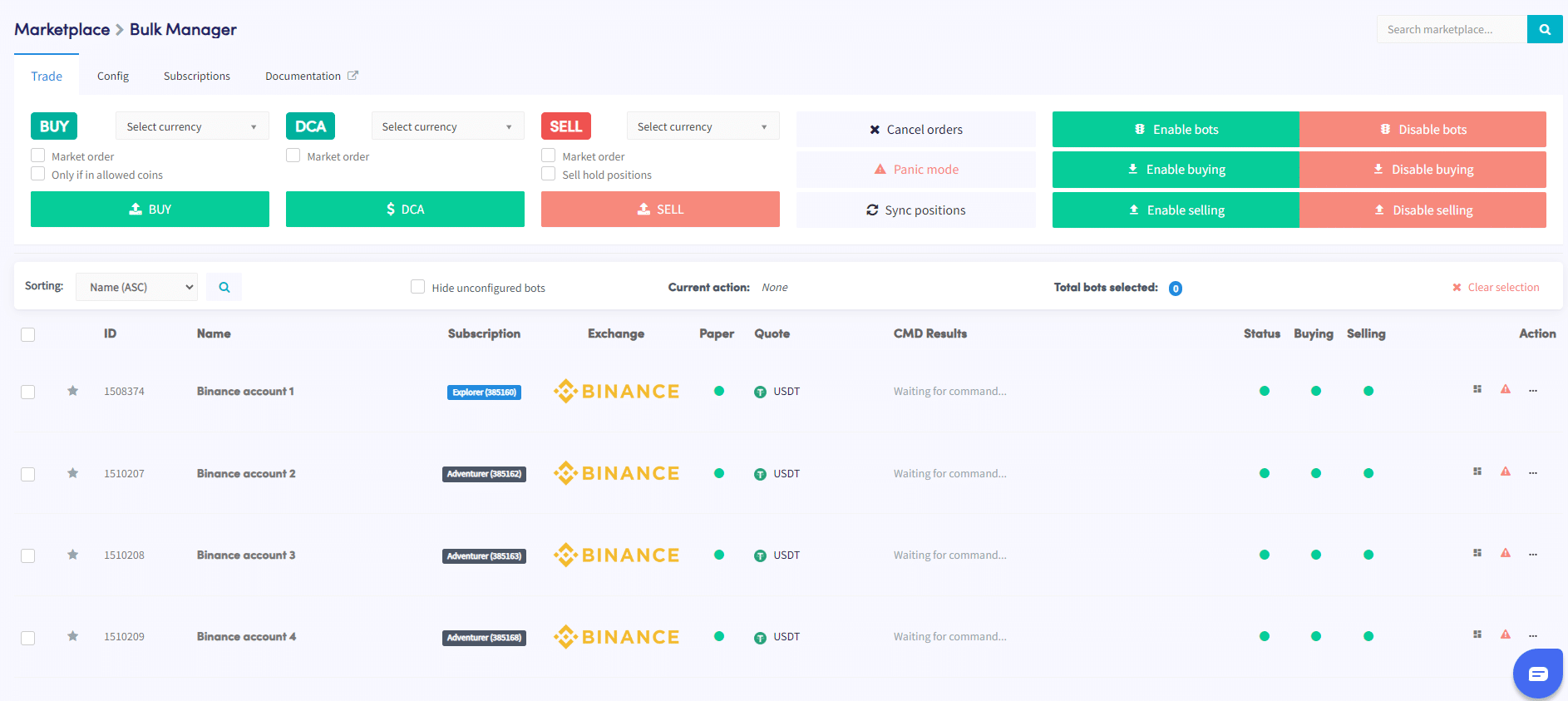
- Within the Bulk Bot Manager interface, select the bots you want to manage. You can select multiple bots using the checkboxes provided.
- Determine the type of action you want to perform on the selected bots. There are three options available: trade, config, or subscriptions.
- Set the specific details of the selected action (Trade, Settings, or Subscription). For example, if you selected a Trade action, specify the trade parameters such as the currency pair, buy/sell strategy, and order size.
- Perform the action to apply it to the selected bots.
- Monitor the Command area in your bots overview to ensure the action completed successfully.
By following these steps, you can conveniently manage multiple bots using the Bulk Bot Manager option. This helps streamline trading activities and ensure efficient management of your Cryptohopper account.
If you encounter any difficulties or need additional assistance while using Bulk Bot Manager, you can contact the support team. They are here to help you take advantage of Cryptohopper’s features.