
How to use technical indicators on Crypto Hopper
This article presents all the technical indicators that Cryptohopper offers. These indicators can be divided into four different types. You can read more about the different types of technical indicators here.
Absolute Price Oscillator (APO )
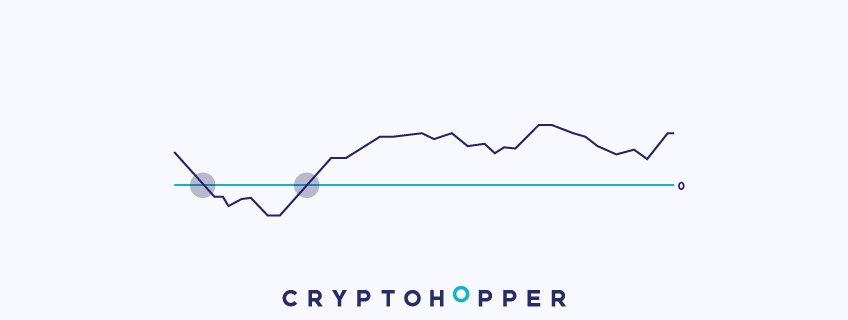
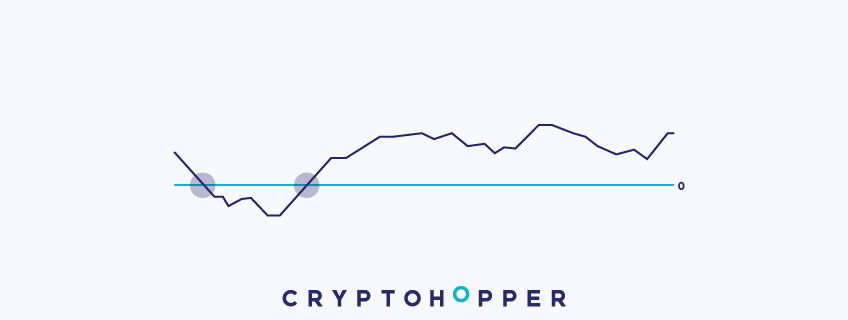
Although it looks like an oscillator on the chart, as shown above, the Absolute Price Oscillator is actually a moving average crossover strategy. Crossovers are one of the most common moving average strategies. With moving average crossovers, two moving averages are applied to a chart: one short and one long.
When the short moving average crosses above the long moving average, it sends a buy signal to your hopper, as it indicates a change in the upward trend. On the other hand, when the short moving average crosses below the long moving average, it sends a sell signal to your hopper, as it indicates a change in the downward trend.
The average is shown as a line moving around zero. The line represents the difference between the short and long moving averages. When the line crosses above 0, it means that the short moving average has crossed above the long moving average, triggering a buy signal.
Similarly, when the line crosses below 0, it means that the short moving average has crossed below the long moving average, triggering a sell signal.
One of the great aspects of this indicator in Cryptohopper is that you can combine different types of moving averages. For example, you can combine a simple moving average with an exponential moving average to create a unique strategy.
Cabinet
Aroon is considered a momentum oscillator, but it is also used to identify trends. Aroon is represented by two lines, Aroon up and Aroon down, and varies between 0 and 100.
Aroon up measures the frequency of new highs during uptrends. If the price continues to rise and make new highs, Aroon up will be 100 and Aroon down will be 0. However, when the price does not make new highs, it means that the uptrend is dissolving and a correction or trend reversal is possible. If it starts making new highs, Aroon down will be 100 and Aroon up 0.
It generates buy and sell signals by crossing lines. When Aroon up crosses Aroon down upwards, it may indicate the start of a positive trend and sends a buy signal. On the other hand, when Aroon down crosses Aroon up upwards, it will send a sell signal.
Aroon Oscillator
The Aroon Oscillator is considered a momentum oscillator, but it is also used to identify trends. The Aroon Oscillator alternates the difference between the Aroon Up and Aroon Down (from the Aroon Oscillator), and is plotted on a graph that ranges from -100 to +100.
The Aroon oscillator works in the same way as the regular Aroon and provides the same buy/sell signals as the regular Aroon (if given the same periods). Therefore, the only difference between the two indicators is the appearance.
This is because when Aroon Up is greater than Aroon Down, the difference will be positive, and both the Aroon oscillator and the regular Aroon will send a buy signal, and the opposite will send a sell signal.
Average Directional Movement (ADX )
Average Directional Movement (ADX) is a useful indicator invented by G. Wells Wilder to measure trend strength.
When a currency is not in a strong trend and is only in a range, the ADX will remain low, likely with a value below 20. However, when the currency starts to have a clear direction, whether up or down, the ADX will rise.
This indicator is commonly used to predict the end of ranging markets and the start of a new trend.
The ADX generates signals when it rises above a certain level. When it is above the level, the indicator will send a buy or sell signal (depending on how you set it up). Similarly, if the ADX is below the level, it will not send a signal.
The ADX is only available to users with a Hero subscription.
Average True Range (ATR )
ATR was invented by G. In the late seventies. This is an indicator of volatility . When the volatility of the market increases, the ATR line increases.
The indicator analyzes the volatility of the asset. When the market is in a range, it remains low. But when the market starts moving rapidly in one direction, no matter if it is up or down, the ATR starts to rise.
This can be an excellent indicator to identify when large investors are entering the market to buy or sell.
In addition, we have added a moving average of the ATR line to generate signals. So, when volume starts to flood the market and volatility reaches its peak, the ATR line will rise above its moving average. Similarly, when volatility decreases and markets range, the ATR line will fall below its moving average.
Equally important, unlike other indicators, the ATR does not generate buy or sell signals because it measures market volatility. Therefore, the price can be either rising or falling.
So, how can this indicator be used in an automated strategy? It can be described as a volatility filter. When the ATR line crosses above the moving average, the market is more volatile and the price is moving, then the ATR will allow other indicator(s) to give a buy or sell signal. However, when volatility is low and the price is in a range, the ATR is below its moving average, and it will not allow other indicator(s) to give a buy or sell signal.
Therefore, it filters trades when market volatility is low and the price is not moving much and allows your strategy to trade when the market is more volatile and the price is trending.
The ATR is only available to users with a Hero subscription.
Bollinger Bands (BB )
Bollinger Bands, created by John Bollinger in the 1980s, measure price volatility through the divergence of two bands, an upper band and a lower band, a moving average.
The upper and lower lines narrow when the price is barely changing over a period of time. However, if there is high volatility, both lines widen to capture these volatility levels.
This indicator has various uses. Among other things, traders often use the upper and lower bands to execute their strategy.
The lower band is used for a buying strategy. Once the price breaks through it, the indicator suggests that the probability of the price correcting or starting an uptrend is high. On the other hand, the upper band will help determine selling or shorting points.
Chaikin A/ D Oscillator
Mark Chaikin invented the Chaikin Accumulation/Distribution Oscillator as an indicator of an indicator that uses the accumulation/distribution line in its calculation.
The Chaikin A/D Oscillator is a momentum indicator that adds volume to its analysis. As many traders say, price follows volume, and this indicator is used to analyze the current momentum of the price to predict future price movements.
Although it has “oscillator” in its name, it actually works differently than most other oscillators in Cryptohopper, and is more like a momentum indicator. The Chaikin A/D oscillator fluctuates around the value of zero. Each time the indicator changes state from positive to negative, it suggests that the momentum of the price is changing.
When the indicator crosses the zero line upwards, it means that the price is gaining positive momentum, which generates a buy signal. Similarly, when the indicator crosses the zero line downwards, bearish momentum is taking over, which sends a sell signal.
Commodity Channel Index (CCI )
The Commodity Channel Index (CCI) was developed by Donald Lambert in 1980. Although it is a momentum indicator, the CCI works differently from other momentum indicators on Cryptohopper.
The CCI fluctuates around the value of zero. When the price rises, the CCI line rises. Alternatively, when the price falls, so does the CCI.
When the CCI is between 0 and -100, it sends a buy signal, and when it is between 0 and +100, it sends a sell signal. These are pending signals, meaning that as long as the CCI is between 0 and -100, a buy signal will be given, and as long as the CCI is between 0 and +100, a sell signal will be given. Extreme signals beyond 100 and -100 will lead to neutral signals.
Directional Movement Index (DMI )
Directional Movement Index (DMI) was invented by G. Wells Wilder and has two lines: positive and negative directional movement.
The two lines measure the strength of positive and negative trends. When the positive directional movement line is above the negative, then the bullish pressure is stronger than the bearish. If the negative line is higher, then the bears are taking control of the market.
The DMI sends a buy signal when the positive directional movement line (green line) crosses above the negative directional movement line (red line). When the positive directional movement line (green line) crosses below the negative (red line), it sends a sell signal. Crossing is specifically noted because it uses non-pending signals, so it only sends the signals once, at the time of the crossing.
Double Exponential Moving Average (DEMA )
DEMA is a trend indicator. Its main feature is a faster response to price changes. Therefore, it reduces the lag between the price and the moving average.
As explained in the EMA video, it is faster than a regular Simple Moving Average (SMA). The DEMA is a significant speed boost to the EMA. Therefore, if you want to use a very fast moving average, the DEMA can be a good option.
Like other moving averages, the DEMA usually trades through crossovers between the fast and slow moving averages.
When the fast moving average crosses the slow moving average upwards, the price is likely to start an uptrend and a buy signal is generated. Similarly, when the fast moving average crosses the slow moving average downwards, the opposite situation occurs, the bears take over and a sell signal is sent.
Elder Ray
Elder Ray is an oscillator that combines trend and momentum indicator components to measure the strength of bullish and bearish trends. The indicator labels the trends as “bullish strength” and “bearish strength,” respectively.
Elder Ray combines exponential moving averages (EMA) to generate signals and identify the dominant force in the market based on the direction of an asset. When it is up, most traders become bullish, and when it is down, they become bearish.
Elder Ray uses pending signals. Therefore, he sends a buy signal as long as the bullish force is greater than the bearish force. Similarly, he sends a sell signal as long as the bearish force is greater than the bullish force.
Elder Ray is only available to users with a Hero subscription.
Exponential Moving Average (EMA )
EMA is a very common trend indicator. It responds much faster than the simple moving average to price changes.
How does it do this? The EMA gives more weight to the most recent closing prices of the moving average. This means that the most recent price levels will largely determine the formation of the moving average.
Like the SMA, traders use this indicator to identify trends and trend reversals. This is done by crossing a fast and slow moving average.
When the fast moving average crosses the slow moving average upwards, a buy signal is generated as the price could start an uptrend. On the other hand, when the fast moving average crosses the slow moving average downwards, the opposite occurs, the bears take over and a sell signal is triggered.
Haul Moving Average (HMA )
Hall’s moving average was developed by Alan Hall , it is a very fast trend indicator.
Moving averages are used to smooth out price noise and identify changes in trend direction. In this case, the All-Way Moving Average is much faster than the EMA or WMA. It gives more weight to recent price levels. Therefore, it responds very quickly to changes in price direction.
The Haul Moving Average, like other similar indicators, generates signals through crossovers between a fast and slow moving average.
When the fast moving average crosses the slow moving average upwards, the price is bullish and a buy signal is generated. However, when the fast moving average crosses the slow moving average downwards, the bears take over and a sell signal is sent.
HMA is only available to users with a Hero subscription.
Ichimoku Cloud
The Ichimoku Cloud was invented by Goichi Hosada in 1969. It includes trend and momentum components and contains five lines.
It includes several moving averages, two of which form what is called a cloud. The cloud is the central component of the indicator and all entry and exit points will rely on it.
The Ichimoku Cloud has various uses. The most common use is creating buys and sells when the price crosses the cloud upwards and downwards.
When a candle crosses the cloud upwards and finishes above it, the price gains bullish momentum and a buy signal is generated. Similarly, if the price crosses the cloud downwards and finishes below it, the price may decline. Therefore, it is possible to close a position or open a short.
Ichimoku Cloud is only available to users with a Hero subscription.
Kaufman Adaptive Moving Average (KAMA )
Developed by Perry Kaufman , the KAMA is a trend indicator that is used to identify the overall trend. It does this by smoothing out noise as price fluctuates.
To account for market volatility, KAMA introduces a so-called efficiency ratio. This factor will reduce the fluctuations of the moving average when volatility is at its peak. In other words, it will give less importance to trends with very high volatility.
This indicator is often used to identify trends and changes in trends.
Like the other moving averages we saw earlier, buy and sell signals are generated by bullish and bearish crossovers. A bullish crossover occurs when the faster moving average crosses the slower one upwards, which will open a position. Bearish crossovers are the opposite, and will close a position or open a short.
MESA Adaptive Moving Average
The Miza Adaptive Moving Average is a trend-following indicator. It adapts to price movements in a very unique way, based on the Rate of Change (ROC), as measured by the Hilbert test.
Like other moving averages, traders use this indicator to identify trends and trend reversals. This is done by crossing a fast and slow moving average.
When the fast moving average crosses the slow moving average upwards, a buy signal is generated, which will hold the signal until a bearish crossover occurs. Similarly, when the fast moving average crosses the slow moving average downwards, it will send a sell signal until the next bullish crossover.
Unlike other moving averages, MESA will not only produce a signal when a crossover between averages occurs. It will provide a sell or buy signal until the next crossover occurs.
Momentum indicator
As its name suggests, this indicator purely analyzes price momentum . It is measured by comparing the current price to the price a fixed number of periods ago.
If the current price is higher than it was, for example, ten periods ago, the momentum line is rising. On the other hand, when the current price is lower than the past price, the line is falling.
A trader can receive buy and sell signals when momentum changes its sign.
The momentum indicator moves from positive to negative, and vice versa, depending on price changes.
When it changes from negative to positive, the bulls are more moderate in the market and the indicator signals a buy signal. However, if the momentum line enters the negative zone, it means that the bears are taking over, which generates a sell signal.
Momentum can be combined with other indicators in the strategy section.
Money Flow Index (MFI )
The Money Flow Index (MFI) is also known as the “volume-sensitive RSI.” It is an indicator that combines volume and price to perform its analysis.
The MFI is a momentum oscillator and can also be viewed as a volume indicator. It measures the flow of money into and out of an asset along with price changes to identify oversold and overbought areas.
Oversold areas are areas where price and volume have increased significantly in a short period of time, indicating that a trend change may be occurring. Overbought areas are the opposite; they are areas where price and volume have decreased abruptly.
The classic way to trade with the MFI is to buy when the MFI is oversold and sell when it is overbought. However, in Cryptohopper, there is a lot of room for customization. The MFI can be set to send a buy/sell signal when the indicator is below, above, or even equal to a certain value. This means that the signals can also be reversed and buy near overbought areas and sell near oversold, allowing the MFI to act as a trend-following indicator.
It is important to note that if you select “Greater than” or “Less than”, the MFI will send pending signals. This means that it will continue to send buy/sell signals as long as the MFI is above or below a certain value. This feature makes the MFI an excellent indicator to combine with others.
Moving Average Converging and Diverging (MACD )
The Moving Average Convergence Divergence (MACD) indicator was developed in the late 1970s by Gerald Appel. It is a combination of a trend indicator and a momentum indicator.
It consists of two lines: the MACD line and the signal line. Both lines oscillate around the zero line.
The MACD gives a buy signal when the MACD line (shown above as the blue line) crosses above the signal line (shown on the chart as the purple line). This can also be illustrated by the gram turning green.
The MACD gives a sell signal when the MACD (blue line) crosses below the signal line (purple line). This can also be illustrated by the gram turning red.
The MACD offers non-pending signals, so it only sends signals in halves. Although the halves can also be displayed when the color of the gram changes.
On-Balance Volume (OBV )
The OBV is a momentum and volume indicator. It combines price and volume in its calculation, and is displayed as a line at the bottom of the chart.
This indicator can provide critical insights into market volume. It will rise when price and volume rise together. However, once price starts to fall, the line will fall as it assumes that volume is likely to be an entry turn.
In summary, whenever the OBV line rises, volume is pushing the price up, which can be used to generate buy signals. On the other hand, when it falls, the price is losing momentum and is likely to fall, which can provide a selling opportunity. To generate buy and sell signals, we have added a moving average to the OBV. Thus, when the OBV line crosses its moving average upwards, it means that the price and volume are rising and a buy signal is generated. Similarly, when the OBV line crosses its moving average downwards, the price is starting to fall and the indicator sends a sell signal.
This indicator can be found in TradingView by typing ” Cryptohopper OBV “.
Parabolic SAR
Parabolic SAR is a trend-following indicator invented by G. Wells Wilder, who also brought us the RSI and ATR.
The Parabolic SAR is represented by a series of dots above or below the price. If the dots are below the price, then the trend direction is positive, and when they are above, it is negative. Therefore, as long as the dots are below the price, a buy signal will be given, and as long as the dots are above the price, a sell signal will be given. These are pending signals, so they will continue to send buy/sell signals as long as the conditions are met.
This makes the Parabolic SAR an excellent indicator to use in combination with other indicators. For example, the Parabolic SAR can be used to detect the overall trend over a long period, and a short-term oscillator can find the reversals of the overall trend.
Percentage change
The percentage change indicator checks how much a currency has increased or decreased in percentage over a specific number of periods. For example, if you set the indicator on a 4-hour chart period with a value of 5, then the percentage change will check the last 20 hours (5 * 4H = 20H).
The percentage change offers pending signals if you set the “Signal when value is:” option to anything other than “equal to”. This means that the percentage change indicator will continue to send signals as long as the condition is true. For example, if you set the percentage change to send a buy signal when the value is “less than or equal to 2”, then a buy signal will be given as long as the currency moves less than 2% during the period and chart period you set.
For the percentage change, it’s important to be careful when setting the value to positive or negative. If you set the value to positive 2, then it will be interpreted as 2%. If you set it to -2, then it will be interpreted as -2%.
The percent change indicator is usually a great indicator to combine with other indicators, as it provides pending signals. The MESA is usually a good option to combine with the percent change. For example, you can use the MESA to find an uptrend and then when the price returns to the uptrend, you can use the percent change to buy. These are just examples, not advice on how to set up your strategies.
Price Percentage Oscillator (PPO )
The Price Percentage Oscillator (PPO) looks and acts almost exactly like the MACD if both have the same values (which can be set in the Strategy Editor). That is, the Price Percentage Oscillator is slightly more reactive than the MACD, even with the same values.
Just like the MACD, the PPO sends a buy signal when the blue line (here called the fast moving average) crosses above the yellow line (here called the slow moving average). When this happens, the gram also turns green.
The PPO then sends sell signals when the blue line (moving average) crosses below the yellow line (slow moving average).
The PPO offers non-pending signals, so it only sends signals when crossings occur, which is also evidenced when the gram changes color.
Rate of Change (ROC )
The Rate of Change (ROC) is a momentum indicator. It measures the percentage change between the current price and the price a specific number of periods ago.
This indicator is commonly used to identify trading opportunities based on changes between positive and negative momentum. The ROC on the chart looks like a momentum line that curves around the zero line.
The ROC sends a buy signal when momentum turns positive, i.e. when the momentum line crosses the zero line upwards. It sends a sell signal when momentum turns negative, i.e. when the momentum line crosses the zero line downwards.
Relative Strength Index (RSI )
The Relative Strength Index (RSI) was invented by G. Wells Wilder in the late 1970s. It is an oscillator that measures price momentum. When the RSI is rising, the bulls are taking over the market. If it is falling, the bears are in power.
The RSI can be used in different trading styles and for a variety of purposes. Typically, traders around the world use the indicator to define oversold and overbought zones.
Oversold areas are areas where the price has risen significantly in a short period of time, indicating that a trend change may be in the offing. Overbought areas are the opposite; they are areas where the price has fallen abruptly.
The classic way to trade RSI is to buy when the RSI is overbought and sell when it is oversold. However, in Cryptohopper, there is a lot of room for customization. The RSI can be set to send a buy/sell signal when the indicator is below, above, or even equal to a certain value. This means that the signals can also be reversed so that it is possible to buy near oversold areas and sell already in the user zones, which will make the RSI act as a trend-following indicator.
It is important to note that if you select “Greater than” or “Less than”, the RSI will send pending signals. This means that it will continue to send buy/sell signals as long as the RSI is above or below a certain value. This feature makes the RSI a great indicator to combine with others.
RSI with cross zones made of
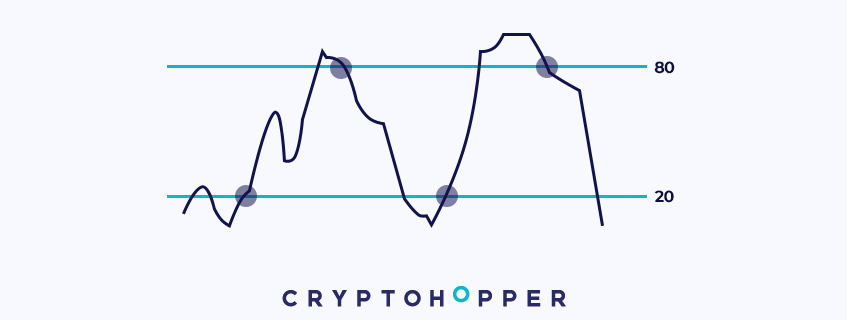
The RSI with Zone Crossovers shares the same values as the regular RSI, but operates differently. The indicator has two states: signal in the IN zone (default), and signal in the OUT zone.
Signal in the IN area:
With this setup, instead of sending a buy signal when the RSI is below a certain threshold (for example 30), it will send a buy signal when the RSI crosses below the threshold and returns to the neutral zone. So in our example it will send a buy signal when the indicator crosses back above 30 after being below it.
Sell signals work in the same way. Instead of, for example, sending a sell signal when the RSI is above a certain threshold (say 70), it will only send a sell signal when the RSI goes above the threshold back to the neutral zone. So in our example it will send a sell signal when the indicator crosses back below 70 after being above it.
Signal in the OUT area:
This setting makes RSI with zone crossings act like the regular RSI. It sends a buy signal when the RSI crosses below a certain threshold, for example 30. So if the current values are 45 and then it crosses below 30, it will send a buy signal. This is very similar to sell signals. A sell signal will be sent when the RSI crosses above a certain value.
Simple Moving Average (SMA )
The simple moving average is a common tool for traders to analyze the overall trend of a price. The SMA is a trend indicator that smooths price movements to filter out the noise of an asset.
Traders often use this indicator to open and close trades through moving average crossings, and to find mobile support and resistance levels on different time frames.
These crossovers are created by pre-defining two moving averages: one slow and one fast. The slow SMA takes into account a larger number of periods, thus capturing the overall trend of the asset. And the fast SMA is calculated with a smaller number of periods, responding more quickly to price changes.
When the fast SMA crosses above the slow SMA, it sends a buy signal. Conversely, when the fast SMA crosses below the slow SMA, it sends a sell signal.
Stochastic (Stoch )
The Stochastic, or Stoch, is a momentum indicator developed by George C. Lane in the 1950s. It is similar to the RSI, but is much more volatile.
It compares the closing price of a candle with previous price levels to determine whether the price is oversold or overbought.
Oversold areas are areas where the price has risen significantly in a short period of time, indicating that a trend change may be in the offing. Overbought areas are the opposite. They are areas where the price has fallen abruptly.
It is important to note that there are two lines with the stochastic: the %K and %D lines. In Cryptohopper we average the two lines. The stochastic then works in a similar way to other oscillators in Cryptohopper such as the RSI or Williams %R. So you can set the stochastic to send buy/sell signals when the indicator is below, above or even equal to a certain value. This means that you can also reverse the signals and buy in oversold areas and sell in overbought areas, so it acts as a trend following indicator.
An essential feature to know is that if you select “Greater Than” or “Less Than”, the Stochastic will send pending signals. This means that it will continue to send buy/sell signals as long as the Stochastic is above or below a certain value. This feature makes the Stochastic an excellent indicator to combine with others.
Stochastic RSI (StochRSI )
The Stochastic RSI indicator (StochRSI) works in a similar way to Stochastic. It combines the Stochastic indicator with the RSI in its calculation, making it an indicator of an indicator.
Specifically, StochRSI applies the stochastic formula to RSI values instead of price data. The new calculation yields a more explosive indicator than the stochastic.
Oversold areas are areas where the price has risen significantly in a short period of time, indicating that a trend change may be in the offing. Overbought areas are the opposite, where the price has fallen sharply.
It is important to note that the StochRSI has two lines: the %K and %D lines. In Cryptohopper we average the two lines just like with the regular Stochastic. After that, the StochRSI works essentially the same way as the other oscillators in Cryptohopper, such as the RSI or Williams %R. So you can set the StochRSI to send a buy/sell signal when the indicator is below, above or equal to a certain value. This also means that you can reverse the signals and buy when the indicator crosses the oversold zones and sell when it crosses the overbought zones, so that it functions as a trend-following indicator.
Note that if you select “Greater than” or “Less than”, the StochRSI will send pending signals. This means that it will continue to send buy/sell signals as long as the StochRSI is above or below a certain value. This feature makes the StochRSI a great indicator to combine with others.
Stochastic with regional crossings
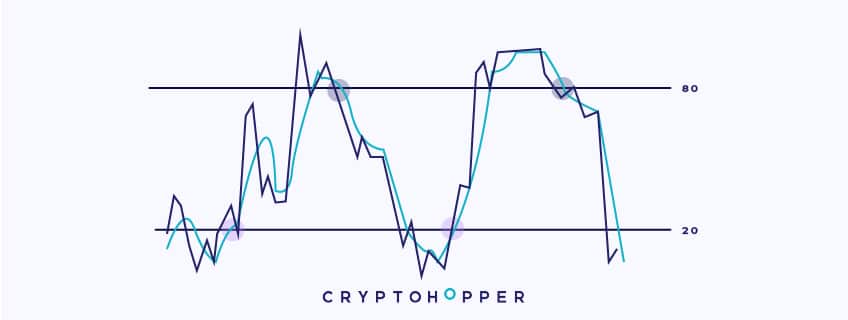
The Stochastic with Crossover Zones shares the same values as the regular Stochastic, but functions differently. It is important to note that the Stochastic has two lines: the %K and %D lines. In Cryptohopper we average the two lines.
The indicator has two states: signal in the IN zone (default) and signal in the OUT zone.
Signal in the IN area:
With this setup, instead of sending a buy signal when the stochastic is below a certain threshold (e.g. 30), it will send a buy signal when the stochastic crosses below the threshold and returns to the neutral zone. So in our example, it will send a buy signal when the indicator crosses back above 30 after being below it.
Sell signals work in the same way. For example, instead of sending a sell signal when the stochastic is above a certain threshold (say 70), it will only send a sell signal when the stochastic crosses above the threshold back into the neutral zone. So in our example, it will send a sell signal when the indicator crosses back below 70 after being above it.
Signal in the OUT area:
This setting makes the Stochastic with Zone Crossings act like a regular Stochastic. It sends a buy signal when the Stochastic crosses below a certain threshold, for example 30. That is, if the current values are 45 and then it crosses below 30, it will send a buy signal. This is very similar to sell signals. A sell signal will be sent when the Stochastic crosses above a certain value.
Stochastic with regional crossings is only available to users with a Hero subscription.
Stochastic RSI with regional crossovers
The StochRSI with Cross Zones shares the same values as the regular Stochastic, but functions differently. There are two lines with the StochRSI: the %K and %D lines. In Cryptohopper we average the two lines.
The indicator has two states: signal in the IN zone (default) and signal in the OUT zone.
Signal in the IN area:
For example, instead of sending a buy signal when the StochRSI is below a certain threshold (say 30), it will only send a buy signal when the StochRSI crosses below the threshold and returns to the neutral zone. So in our example, it will send a buy signal when the indicator crosses back above 30 after being below it.
Sell signals work the same way. For example, instead of sending a sell signal when the StochRSI is above a certain threshold (say 70), it will send a sell signal when it crosses above the threshold back into the neutral zone. So in our example, it will send a sell signal when the indicator crosses back below 70 after being above it.
Signal in the OUT area:
This setting makes it act like a regular stochastic. It will send a buy signal when the StochRSI crosses below a certain threshold, for example 30. So, if the current values are 45 and then it crosses below 30, it will send a buy signal.
This is very similar to sell signals. A sell signal will be sent when the RSI crosses above a certain value.
Stochastic RSI with Zone Crossovers is only available to users with a Hero subscription.
Ultimate Oscillator (UO )
The Ultimate Oscillator (UO) is a momentum indicator invented in 1976 by Larry Williams. The Ultimate Oscillator combines short, medium, and long periods together to analyze price momentum.
Since it uses three different time frames, the indicator is less volatile. The UO can be used in different trading styles and for a variety of purposes. Typically, traders around the world use the indicator by defining oversold and overbought zones.
Oversold areas are areas where the price has risen significantly in a short period of time, indicating that a trend change may be in the offing. Overbought areas are the opposite; they are areas where the price has fallen abruptly.
The classic way to trade with the UO is to buy when the UO is oversold, and sell when it is overbought. However, in Cryptohopper, there is a lot of room for customization. The UO can be set to send a buy/sell signal when the indicator is below, above, or even equal to a certain value. This means that the signals can be reversed and you can buy in oversold areas and sell in overbought areas, making the UO act as a trend-following indicator.
It is important to note that if you select “Greater than” or “Less than”, the UO will send pending signals. This means that it will continue to send buy/sell signals as long as the UO is above or below a certain value. This feature makes the UO an excellent indicator to combine with others.
Tilson Moving Average (T3 )
Developed by Tim Tilson, the Tilson Moving Average (T3) is a trend indicator with the advantage of having a lower latency than others. That is, a faster moving average.
The T3 moving average is an indicator of an indicator because it includes several EMAs of another EMA. Unlike any other moving average, it also adds what is called a volume factor, a value between 0 and 1.
Like the SMA, traders typically use this indicator to identify trends and trend reversals. This is primarily done by crossing between a fast and slow moving average.
When the fast moving average crosses the slow one upwards, a buy signal is given as the price is indicating bullish signs. However, when the fast moving average crosses the slow one downwards, the opposite situation occurs, the bears take over and a sell signal appears.
Time Series Forecasting (TSF )
Time Series Forecast is a trend indicator that applies linear regression to calculate the trend of the price.
This reduces the lag of a regular moving average because it attempts to predict the next period’s price through statistical calculations with previous data.
This indicator is interpreted in the same way as a moving average. It generates signals through crossings between the time series forecast line and a moving average.
When the time series forecast line crosses the moving average upwards, the price is bullish and the indicator will open a position. When it happens the other way around, it sends a sell signal to close the position or open a short.
Triple Moving Average (TMA )
The triple moving average is a trend indicator that has been used twice. That is, it is a simple moving average of a simple moving average.
This creates a very smooth moving average that does not react quickly to market volatility, therefore, filtering out price noise and indicating the central trend of an asset.
Of course, like the standard SMA, this indicator is used to identify trends and trend changes. This is done by crossing between a fast and slow moving average.
This way, when the fast moving average crosses the slow one upwards, the price can start an uptrend and it will generate a buy signal. When the fast moving average crosses the slow one downwards the opposite situation happens, the bears are in power and the sell or short signal is opened.