How to use Crypto Hopper Backtester

Cryptohopper’s Backtester tool is a new feature now available exclusively to Marketplace sellers. With this tool, you can backtest all of your template and bot settings, except for triggers, built-in strategies (which appear in the list of strategies in your settings), and TradingView Alerts.
Prerequisites
Before starting use, check the following:
- You have an account on Cryptohopper .
- You have created a template or bot for the trading bot.
- You have a subscription to Cryptohopper .
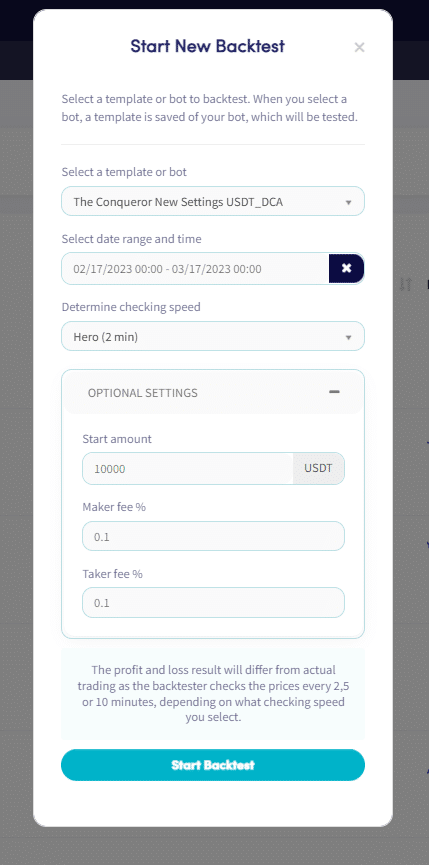
How to start a new test (Backtest )
- If you haven’t selected a bot yet, go to your bots view and select a bot. Then click Backtesting, then Go to new backtesting.
- Click the New backtest button.
- Select a template or bot that you want to perform a retro-test on.
- Select a date range and time period for the review. Please note that the maximum period allowed is one month.
- Set the test speed you want to use.
- (Optional) Set your starting amount and Maker and Taker commission percentages, if desired.
- Click the Start Backtest button to begin the testing process.
During the test, you can track the progress in the test view, which shows how far along the test is and which transactions it has detected. If you click Retro Test, you can view the following information:
- Name of the template or bot
- stock exchange
- Currency Quote
- market
- The test period
- Subscription level
- When was the test created and when was the last processor executed?
- Description
- Profit during the test period
- Successful sales
- Loss sales
- status
Click here for more information about the Backtester tabs.