
How to understand the Signalers page on Crypto Hopper

This guide explains what the Signaler column is and what you can find in it.
Signaler page
Overview

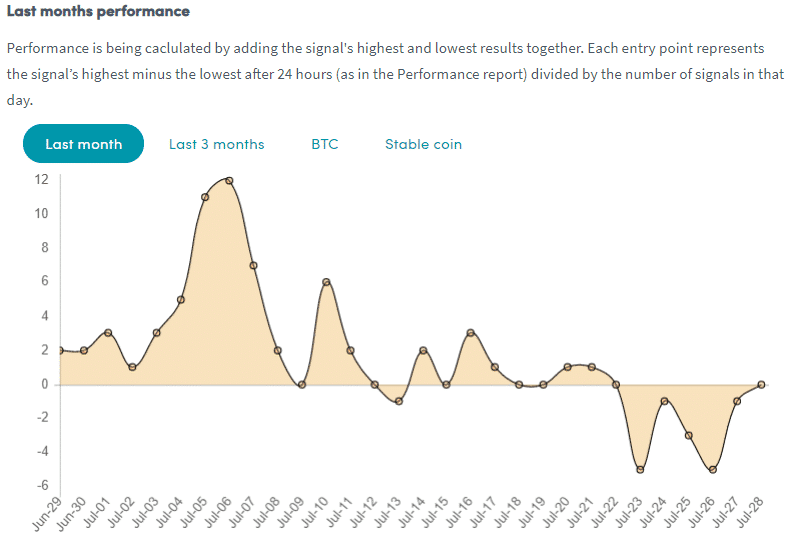
Here you can find a lot of information that can help you determine if the Signaler is right for your needs. Make sure that the exchanges that the Signaler uses are compatible with your exchange. If not, you will not receive signals for your exchange. In addition, you will find a graph that shows how the Signaler performed in the last month or in the last 3 months. The numbers on the left represent the positive or negative profit. The dates below show the dates in the month. With this information, you can see the average profit/loss per day.
Performance reports
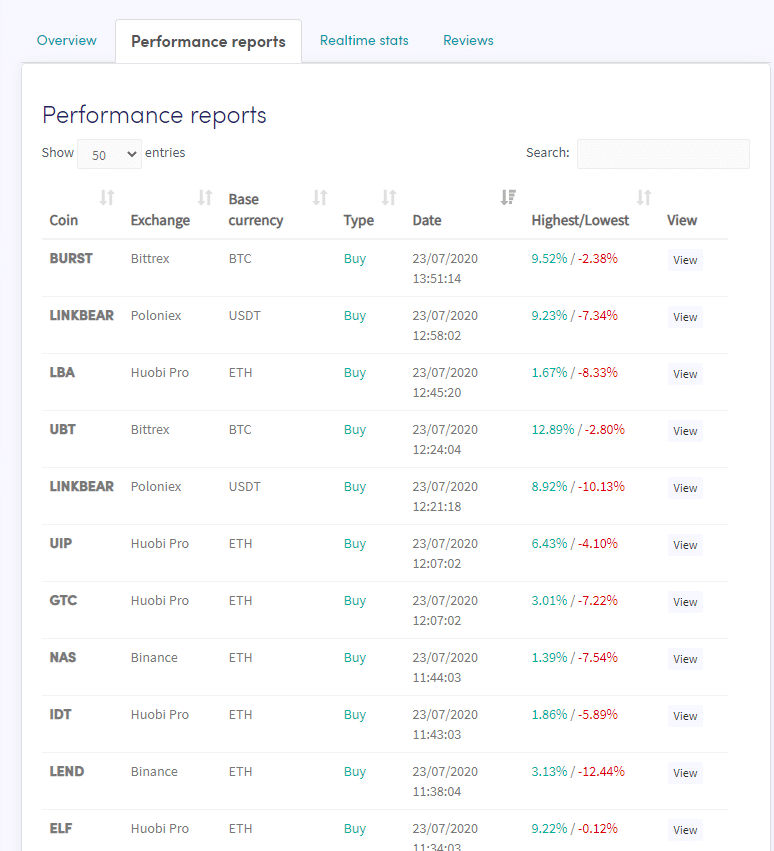
Here you can find the recently marked coins and their profit. Make sure the Signaler is sending signals for the coins you want to trade and what profit was made.
Real-time statistics
Here you can find an overview based on all trading data from the last month.
Reviews
Here you can find what other traders think about the Signaler.
Additional information
Important: Marketplace sellers and Signalers are not authorized to fully manage your account. Never share your API keys or password for security reasons. Most sellers offer support through various channels, including email (however, they are not required to do so). Only use screenshots and do not provide them with your account password when contacting them.
If you are unsure about the level of support provided by any Signaler, you can always contact them before purchasing their service. You can find each Signaler’s contact information by clicking on one of their items in the Marketplace.
If you liked Signaler and the signals it sends, don’t forget to leave a review!