
How to understand the different AI settings in Crypto Hopper

This article explains the different definitions for AI.
Buy/Sell Signal Settings in AI Strategy Builder
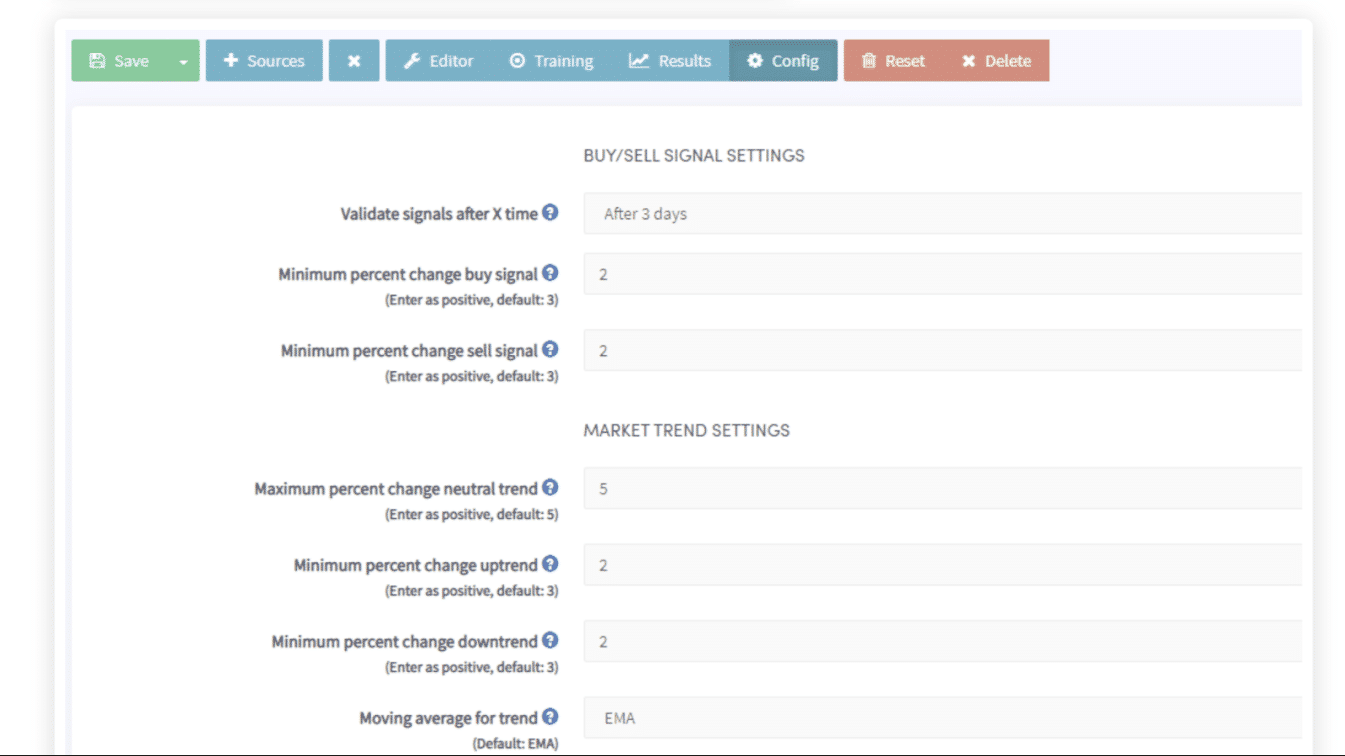
Validate signals after X time
Choose the time frame you want to check if a signal was good or bad. When building an AI for day trading, it is recommended to use one day or less. If you want to trade with the AI over a longer time frame, 3-5 days is recommended. In our example, we used a time frame of 2 days.
Minimum percentage change for a buy signal
Fill in the percentage of profit required for a buy signal to be valid. For example, if you fill in 5, it means that you want to see at least 5% profit within 2 days after each sell signal is given. The 2 days can be set in the previous field.
Minimum percentage change for a sell signal
Fill in the percentage loss required for a sell signal to be valid. For example, if you fill in 3, it means that you want to see at least a 3% loss within 2 days after each sell signal is given. The 2 days can be set in the first field.
Market trend definitions
Maximum percentage change to neutral trend
Fill in the percentage change required in the neutral trend for a market trend signal to be valid. For example, if you fill in 5, this means that you would like to see the neutral trend signal move less than 5% within 2 days for it to be valid. The 2 days can be set in the first field.
Minimum percentage change for an upward trend
Fill in the percentage required for the trend to be up and the market trend signal to be valid. For example, if you fill in 4, this means that you would like to see the trend signal move at least 4% up within 2 days for it to be valid. The 2 days can be set in the first field.
Minimum percentage change for a downtrend
Fill in the percentage required for the trend to be down and the trend signal to be valid. For example, if you fill in 4, this means that you would like to see the trend signal move at least 4% down within 2 days for it to be valid. The 2 days can be set in the first field.
Moving average for trend
Select the moving average that will be used to smooth the 1-minute price history to verify the market trend. The longer the time set, the more small highs will be rejected/converted to determine the trend. This example uses default settings. The default moving average is EMA.
Moving average period
Fill in the period you would like to use for the moving average. Default is 4. The minimum is 1 and the maximum is 60.
Other definitions
Maximum score for neutral signals
Fill in the value. This is used to know how much neutral signal should be included in the score calculation. A lower value gives more importance to buy and sell signals. A higher value gives more importance to neutral signals. Enter a value between 1 and 100. Default: 15. This setting ranks the importance of neutral signals in your signal strategy. If your neutral signals are irrelevant, you can discard them by entering a value of 1. If your neutral signals are essential, you can enter a value of 80. Important: This option only affects signal strategies, not trend strategies.