
How to train your AI on Crypto Hopper

This guide explains everything about training your AI.
Training
When you first start using Algo Intelligence, there is no need to train it. If you do not train Algo Intelligence, all buy and sell signals will be used to open and close positions. Initially, 100% of the signals will be used. In the AI Strategy Builder settings, you should also set “Validate signals after time”. Over time, it will find fewer opportunities to buy and sell as the AI learns which strategies usually give good and bad signals based on the validations. Signal validation is done according to trends, and the weighted average is always considered. When using only signal strategies, it is not recommended to use “Corrected score”.
When is it necessary to retrain Algo Intelligence ?
Once the AI is trained, there is no need to retrain it. In the following cases, the AI needs to be retrained:
-
When a new source is added. Only that source needs to be trained. Otherwise, you train all sources twice. The AI will add the results of the calculations to your AI.
-
When you have made adjustments to your AI settings or if you have reset the AI. All trading pairs must be retrained. For example, if you have changed the percentage of profit you want to achieve at a certain time.
-
When you have cloned the AI and want to use it in another bot with different markets.
The difference between the AI in a virtual trading bot and a trading bot with real money
When using the same AI in a virtual trading bot and a trading bot with real money, there can be a difference. The same AI checks the same market within a minute. It uses the current signal. If both bots check the market at the exact same moment, they will have the same signals. In most cases, the check is not done at the exact same time. Therefore, there will be different signals. The advantage is that you can use multiple bots to check the markets more frequently and faster.
Results
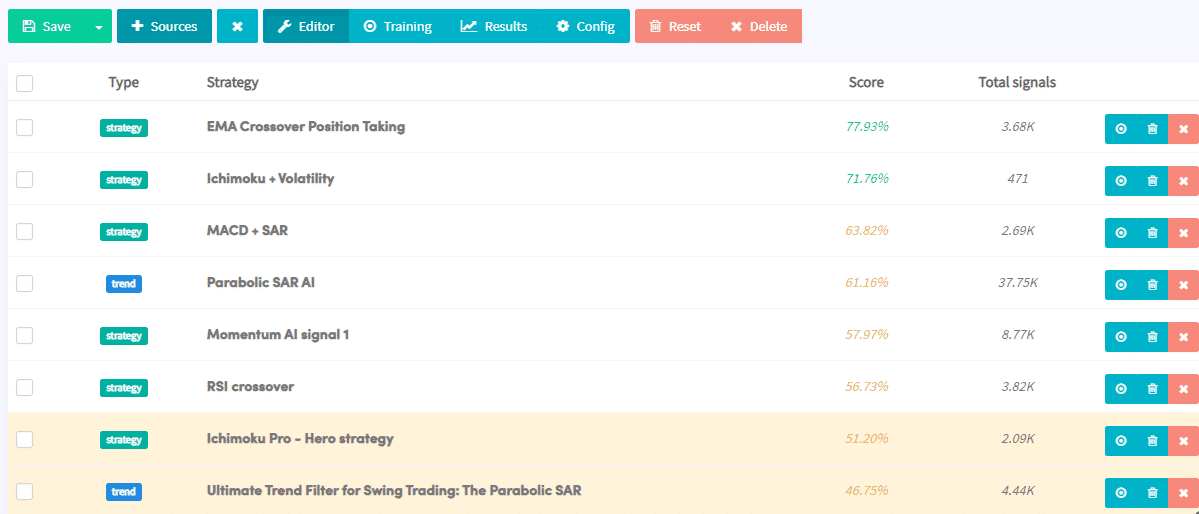
Go to the editor section to see the strategies ranked by their score. The highest scores are displayed first and the lowest last. The “Total signals” for a trend strategy are not real signals. They are changes in the trend. That is, 37.75K is the number of times the trend changed. Strategies that demonstrate good performance do not include a background color. Strategies with less good performance are colored yellow and bad strategies are colored red.
Click on a strategy to see how it performed in detail. You can see how it performed in different market conditions, the average score, the most successful trading pairs, and more. Depending on the type of forex trading being done, many trades can last up to a week or even longer. Keep in mind that it is possible to create a successful AI with a lower score. An AI with the best strategies ranging from %-60% can still be profitable, depending on the settings selected in the AI settings.
On the right side of the screen, you can see the average sell signals provided in the same market conditions. Each of the six scores represents how well the signals achieved their objectives during the respective trend. For example, the buy score in an uptrend represents the percentage of times the buy signals achieved a 5% profit within 2 days (which in our case is 83.81% or 849/1013). Another example is the 73.22% for the average sell score in a downtrend. This means that out of the 1,352 signals sent, around 990 times, the price fell by at least 3% within 2 days, as selected in the settings section.
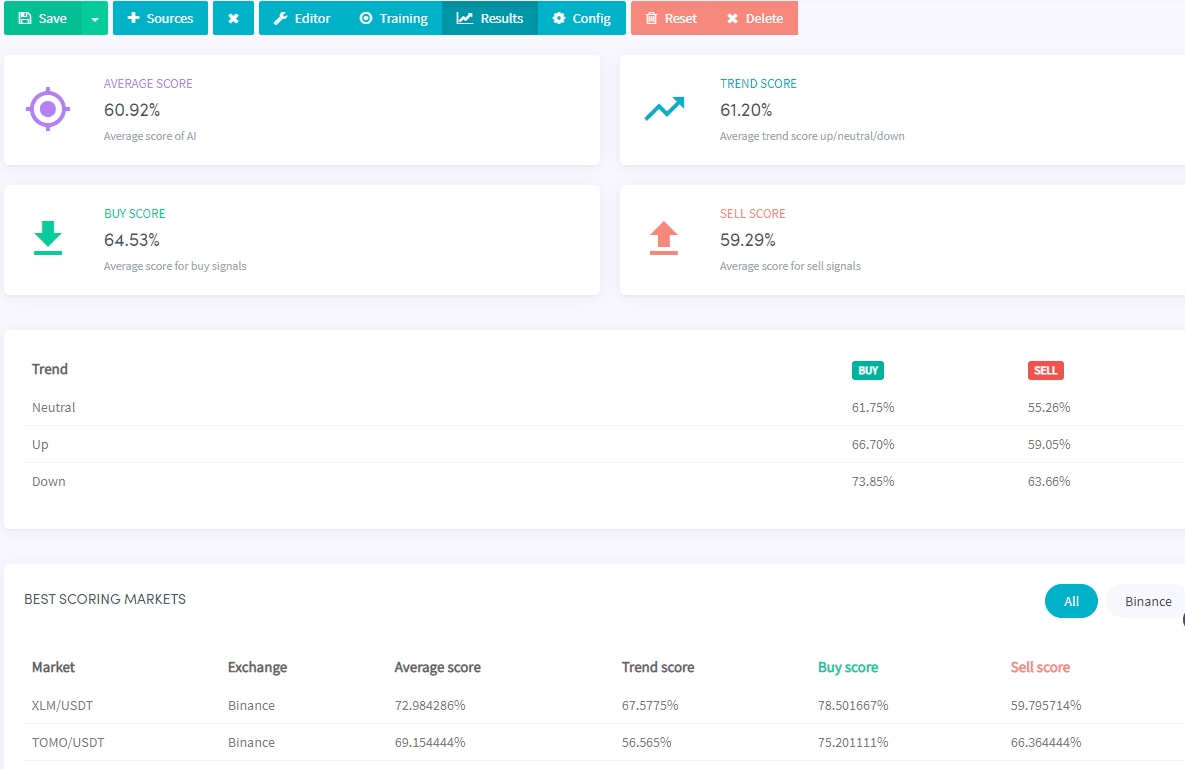
Go to the results section. Here you can see the average trend, buy and sell scores. This is based on the criteria you have set.
Let’s see how the strategy performed in each type of trend. For example, the average score in a buy trend was better than the average score in a sell trend. You may not see any buy or sell signals in a downtrend. The lack of signals could mean either that your strategy is only built to operate in an uptrend, or that your trend strategy takes a strict approach to identifying a downtrend.
Additional information
Training one trading pair takes about four hours. This depends on the number of sources you have added to the AI. After training, you need to select several trading pairs under “Coins and amounts” in your basic settings.
Reset
Click Zero if you want to delete all old data and start collecting new data.
Deletion
Click Delete and your AI will be deleted. This action cannot be undone.