
How to perform backtesting in Crypto Hopper

This guide shows how to set up Backtest and explains the settings that need to be filled in.
Prerequisites
Before you begin, check the following:
• You have a Cryptohopper account
• You have an Explorer, Adventurer, or Hero subscription from the Cryptohopper service
Backtest Definition
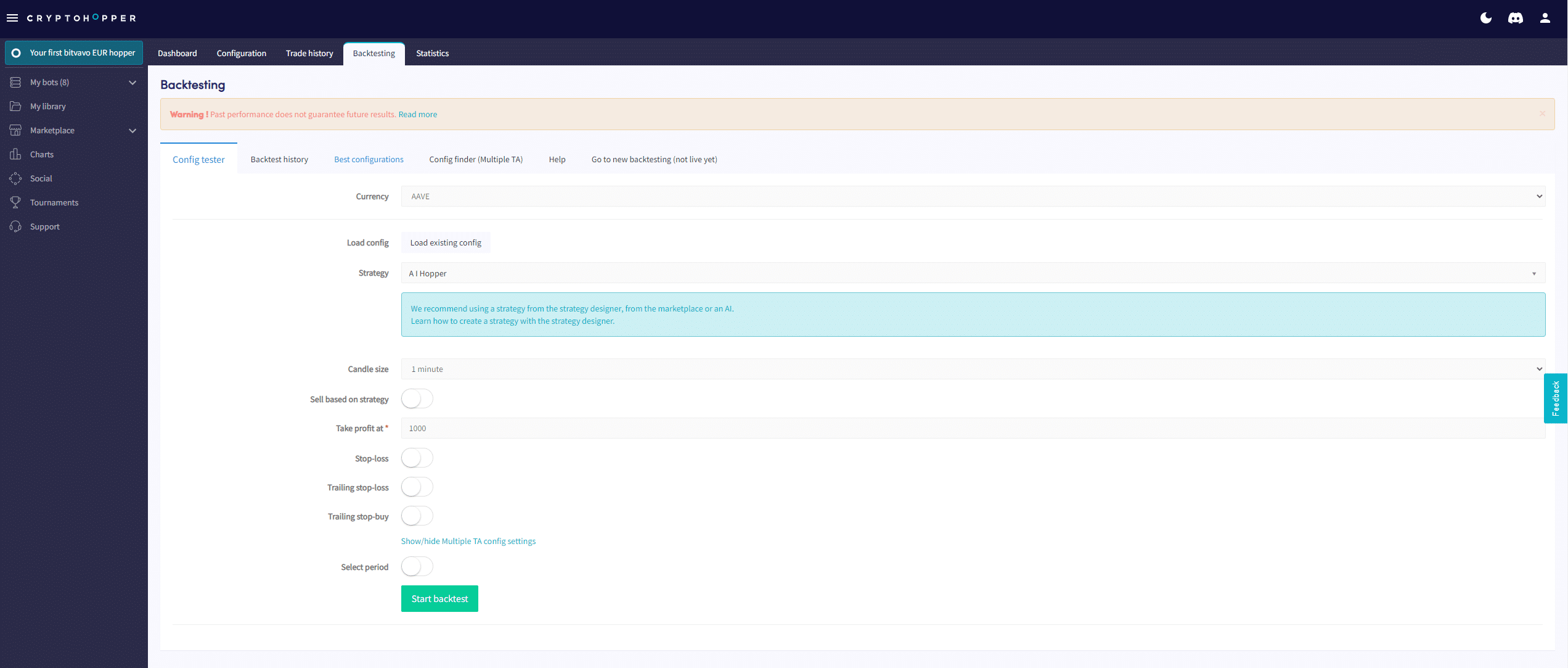
- Log in to your Cryptohopper account.
- Pass it to the bot you want to use for Backtest.
- Click on “Backtesting”.
- Fill in the required fields.
- Click “Start Backtest”.
Backtest settings
currency
Select the currency you want to backtest.
strategy
Select the strategy you want to backtest.
Selling according to strategy
Switch to the position if you want to sell a position according to the strategy.
Taking profit
Fill in the desired profit percentage before selling the position. When a currency changes by this rate, your bot will execute a sell order.
Stop Loss
Switch to the mode so that your bot uses Stop-Loss.
Stop Loss Percentage
Fill in the percentage by which your position needs to decrease before the Stop-Loss is triggered. Enter a positive number. For example, if you want to sell the currency when the price decreases by 2.5%, enter 2.5%.
Trailing Stop Loss
Switch to the mode so that your bot uses Trailing Stop-Loss. Trailing Stop-Loss percentage. Fill in the percentage that the currency should fall. When this percentage is reached, your bot will try to sell the currency.
Activate Trailing Stop-Loss
Fill in the percentage of profit your coin needs to reach before selling. It should cover the optimal commissions you pay for the trade. For example, if you enter 1%, the Trailing Stop-Loss will trigger when the position reaches 1% profit. The bot will sell the coin when it drops below the Trailing Stop-Loss percentage.
Using only Trailing Stop-Loss
Switch to a mode where the bot will only focus on using Trailing Stop-Loss to sell a position. When enabled, this setting will disable profit taking and only use Trailing Stop-Loss to sell a position.
Trailing Stop-Buy
Switch to the position to activate Trailing Stop-Buy.
Trailing Stop-Buy Percentage
Fill in the percentage by which the price needs to rise before the Trailing Stop-Buy is triggered.
Choose a period
Go to the status if you want to select the period you want to perform a Backtest on. If you go to the status, fill in the date range.
Additional information
Important: Remember that the Backtester checks your indicator values every 5 minutes. Therefore, the testing cycle of your strategy in the bot with real money may yield different results. When using small candle sizes, the strategy may skip some candles. Below are the timeouts for different subscriptions.
- Pioneer: Manual trading only. Therefore, the Backtester is not available.
- Explorer: 15 to 20 minutes.
- Adventurer: 6 to 12 minutes.
- Hero: 2 to 6 minutes.
- Paper trading bot: 10 minutes.