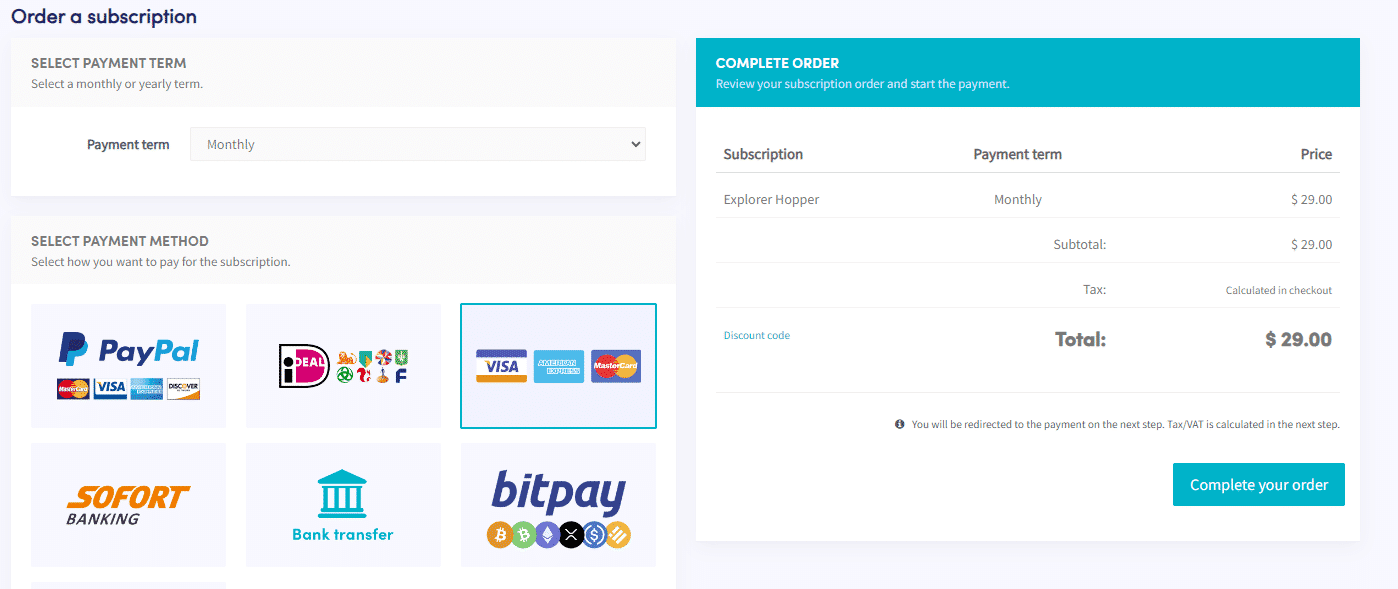
How to pay with Paddle on Crypto Hopper

This guide shows how to pay with a credit card (Paddle).
Prerequisites
Before you begin, check the following:
- Do you have an account on Cryptohopper?
- Want to pay for your subscription with a credit card (Paddle)?
Important: If Cryptohopper invoices are needed for accounting purposes, it is recommended to use Paddle invoices, as they charge tax/VAT and show the exact amount.
How to pay with a credit card (Paddle )
- Log in to your Cryptohopper account.
- Click on “ Subscriptions ”.
- Click on “New Subscription”.
- Select the subscription you want to purchase.
- Choose the payment terms.
- Click on the image with Visa, American Express, and Mastercard.
- Click “Complete Order.” You will be taken to Paddle.
- Click “Pay with Card”. The price may vary slightly as local taxes or VAT may apply. When using a business account on Cryptohopper, you can add a VAT number.
- Fill in your card details.
- Click on “Register now”.
- After you have completed the payment, you will receive an email confirming the payment.