How to create triggers with TradingView alerts in Crypto Hopper

This guide explains how to use TradingView alerts to create Triggers.
Prerequisites
- You have a Cryptohopper account .
- You have an Explorer, Adventurer, or Hero subscription.
- You have a TradingView subscription .
- You know what Triggers are used for.
How to Create Triggers with TradingView Alerts
- Go to your Basicconfig, select Triggers and click “New”.
- Give your Trigger a name.
- Enable your trigger.
- The “Select Exchange”, “Select Market”, and “Select Candle Size” fields can remain as they are.
- Select “TradingView” as the indicator.
- Select one of the actions displayed.
- Set the cooling period in minutes, hours, or days.
- Go to Cryptohopper’s TradingView app.
- Open TradingView and select the market you want to use for the TradingView alert.
- Click the notification button and go to the notifications tab.
- Copy the Webook address displayed in Cryptohopper and paste it into the Webook address input field.
- Go to the Cryptohopper alert generator and select “Trigger” as the action.
- Select the bot and trigger for the TradingView alert and click “Create”.
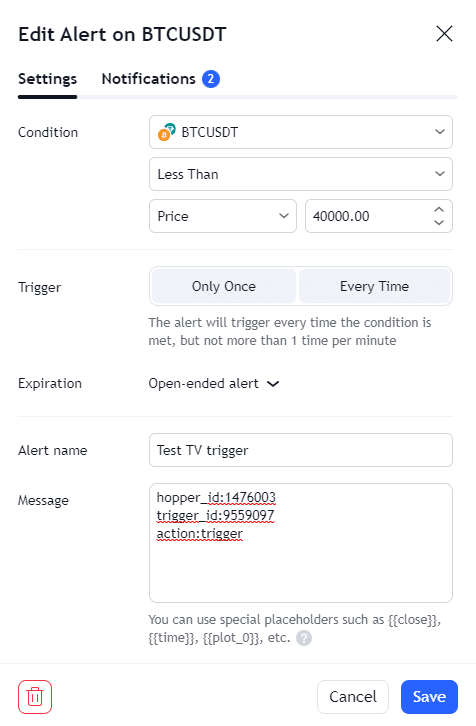
- Paste the alert message into TradingView under “Settings”.
- Click Save, and your trigger is ready.