
How to configure subscription settings in managing quantitative bots in Crypto Hopper

This guide explains what you can do with the Bulk Bot Manager subscription settings. It details the features and options available to manage your bot subscriptions effectively. Whether you are interested in signal subscriptions, assigning subscribers, or purchasing them in bulk at discounted prices, this guide will guide you through the process.
What to consider when using Mass Bot Manager subscription settings
The Bulk Bot Manager subscription settings allow for easy management of all your trading bot subscriptions. It’s important to consider the types of subscriptions you want to use, such as signal subscriptions and subscription allocation. Plus, did you know that purchasing subscriptions in bulk can give you ongoing discounts?
Subscription
Each subscription plan offers different trading features and services. Higher subscription levels offer benefits such as faster technical interval times to test your strategy, the ability to trade more currencies, a higher number of open positions and backtests, an AI-based strategy builder, and more .
Subscription Summary
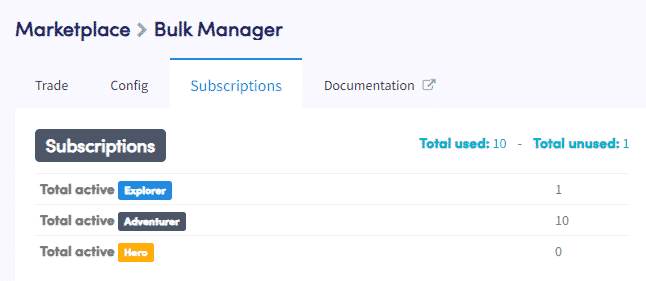
The subscription summary shows the number of subscriptions for each plan, along with the total number of used and unused subscriptions.
Number in use / Number not in use
By clicking on “Number in use” or “Number not in use,” you can cancel or renew specific subscriptions. For managing multiple subscriptions, it is easier to use the bulk subscription renewal or cancellation buttons.
Signals
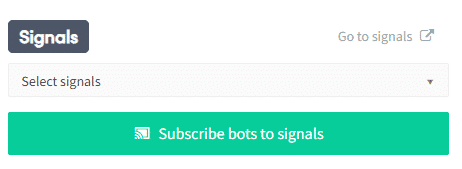
Signals are trading signals offered by Signalers on the Cryptohopper marketplace . A single signal subscription can be used across multiple bots. If you run multiple bots and prefer to route all your automated trades based on Strategy Designer (AI) or TradingView alerts, you may find it beneficial to register as a Signaler and send signals to all bots at the same time.
Select signals
Select the Signaler you are subscribed to.
Assign bots to signals
Click “Assign Bots to Signals” to assign the Signaler subscription to the selected bots.
Subscription settings

Subscription settings allow you to manage your subscriptions efficiently. You can assign, release, purchase, renew, and cancel subscriptions as needed.
Automatic subscription allocation
Enabling this option automatically assigns subscriptions to bots that don’t already have a subscription. However, advanced users often prefer to disable this feature to easily manage their bot subscriptions.
Assign subscribers
Select a number of bots that require a subscription. If you have different types of bot subscriptions, such as 5 Hero and 3 Adventurer, the Mass Bot Manager will automatically assign the subscriptions in order, regardless of your subscription preference. If you prefer to decide which subscription plan to assign to a specific bot, click “Pioneer” in the Mass Bot Manager Exchange Overview (link to another article).
Release subscriptions
Select a number of bots from which you would like to release the subscription. Released subscriptions will be available again to be assigned to other bots.
Acquire new subscribers
Select the subscription plan you want to purchase, set the payment terms, specify the number of subscribers, and click “Order Subscriptions.” Purchasing additional subscriptions gives you bigger discounts. Learn more about ordering subscriptions with bulk discounts here.
New Subscriptions
Select the bots with active subscriptions, set the payment terms, and click “Renew Subscriptions.” Renewing more subscriptions gives you bigger discounts. Find out how much of a discount you can get by renewing subscriptions here.
Cancel subscriptions
Select the bots with active subscriptions and click “Confirm Bulk Action.” Canceled subscriptions remain valid until the end of the subscription period.
Using these instructions, you can use the subscription settings in the Mass Bot Manager to easily manage your commercial bot subscriptions.