
How to add a strategy or template as a marketer on Crypto Hopper

This guide shows the different settings when adding a strategy or template as a Marketplace Seller.
Settings under Details
name
You must enter a name for the strategy or template. The default is the name you saved the item with.
Description
You must fill in a description of the product, provide expected performance, and specify contact information, recommended settings, and anything else that is important.
Price in US dollars ($)
Fill in the price. Click on “View all prices and proceeds”. This will take you to a menu where you can see how much you will earn at each price level after deducting the Cryptohopper fee.
Logo
You need to upload a logo. This is the image that will be displayed on the market. The logo size must be 600px X 430px otherwise it will not work. The default is the logo you chose when building the strategy. To change the logo, click on the “Change Logo” button or on the image itself and then select “Upload Logo”.
Promotion
A promo image must be uploaded. This image appears as a banner at the top of the description. The minimum size for this image is 1200px X 450px. To change this, click the “Change Promo” button or on the image itself and then select “Upload Logo”.
Social networks
You must fill in your social media details. You can fill in your Twitter, Facebook, and Telegram channel details. Although you can fill in your social media details here, sometimes it’s a good idea to include them in the description as well.
Settings under Settings
On the left side, there is another screen with settings.
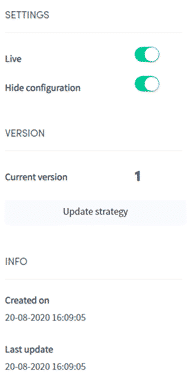
Life (Live)
Toggle the switch and click “save” to publish the strategy to the market. This way it will be available for download by users.
Show in Marketplace
Toggle the switch to disable this feature. This allows you to test a product or restrict access to people who have the link. When disabled, the strategy or pattern will be hidden from the market.
Hide configuration
Toggle the switch so that users who have downloaded the strategy will not see what is inside. They will not be able to see the technical indicators and candlestick patterns, the necessary measurements, signals, etc. Only the name and description will be visible.
Update Strategy
Click here when you want to update the strategy or template. Please make sure to provide enough information in the text attached to each update.
Information
Here you can see when the strategy was first created, and when it was last updated.
Commissions and Exclusivity
Cryptohopper takes a 30% commission on every sale. You can see exactly how much you will earn on every sale by clicking “View all prices and proceeds”. You can lower the commission to 15% and get additional benefits by becoming a Seller Exclusive. For more information on becoming a Seller Exclusive, send an email to mihai.stoica@cryptohopper.com.